Every time I start a new Go CLI, the first hour goes the same way, and none of it is the actual tool. Config loading. A logger. An update command. An error path that prints something a human can act on. A help system. I built go-tool-base so I’d never write that hour again, and I’ve spent a good few posts explaining how the pieces work inside. This series is the other half: how you use it. By the end you’ll have a real CLI with all that wiring for free. This part scaffolds one and gives it its first command.
One note on shape before we start: each part stands on its own. Finish this one and you’ve got a working, buildable tool. Later parts add configuration, AI, self-update and telemetry, one at a time. Where you want to know how a piece works underneath, I’ll link the deep-dive as we go.
Install the gtb CLI
go-tool-base ships an automation CLI called gtb. Install it with the script
from the installation docs:
curl -sSL \
  "https://gitlab.com/phpboyscout/go-tool-base/-/raw/main/install.sh" | bash
That fetches a pre-built release, embedded docs and all, and drops gtb in
~/.local/bin, so make sure that’s on your $PATH. Then check it’s there:
gtb version
One thing to get out of the way before we build: versions. As I write this,
gtb version prints go-tool-base v0.6.0, and that’s what every command and
snippet in this series is verified against. It’s a young tool that’s still moving
quickly, and the install script always pulls the latest release, so if you’re
reading this later and something doesn’t line up, a newer version is the likeliest
reason. When a release changes something that matters to this series, I’ll cover
it in a follow-up.
Scaffold a project
One command stands up a whole project, and gtb gives you two ways to drive it.
The direct way, with flags, is good for scripting and for repeating a setup exactly:
gtb generate project \
  --name mytool \
  --repo myorg/mytool \
  --description "My CLI tool" \
  --env-prefix MYTOOL \
  --path ./mytool
--env-prefix is worth setting now: it’s the prefix for the environment
variables that can override your config later (so MYTOOL_LOG_LEVEL rather than
a bare LOG_LEVEL that would clash with every other tool on the box). The
wizard defaults it to your tool’s name in capitals; with flags it’s worth being
explicit. We’ll lean on it in part 2.
(gtb generate cli is the same command, if you prefer that name.) Or leave the
flags off and gtb walks you through an interactive prompt instead, which is
the gentler way the first time:
gtb generate project
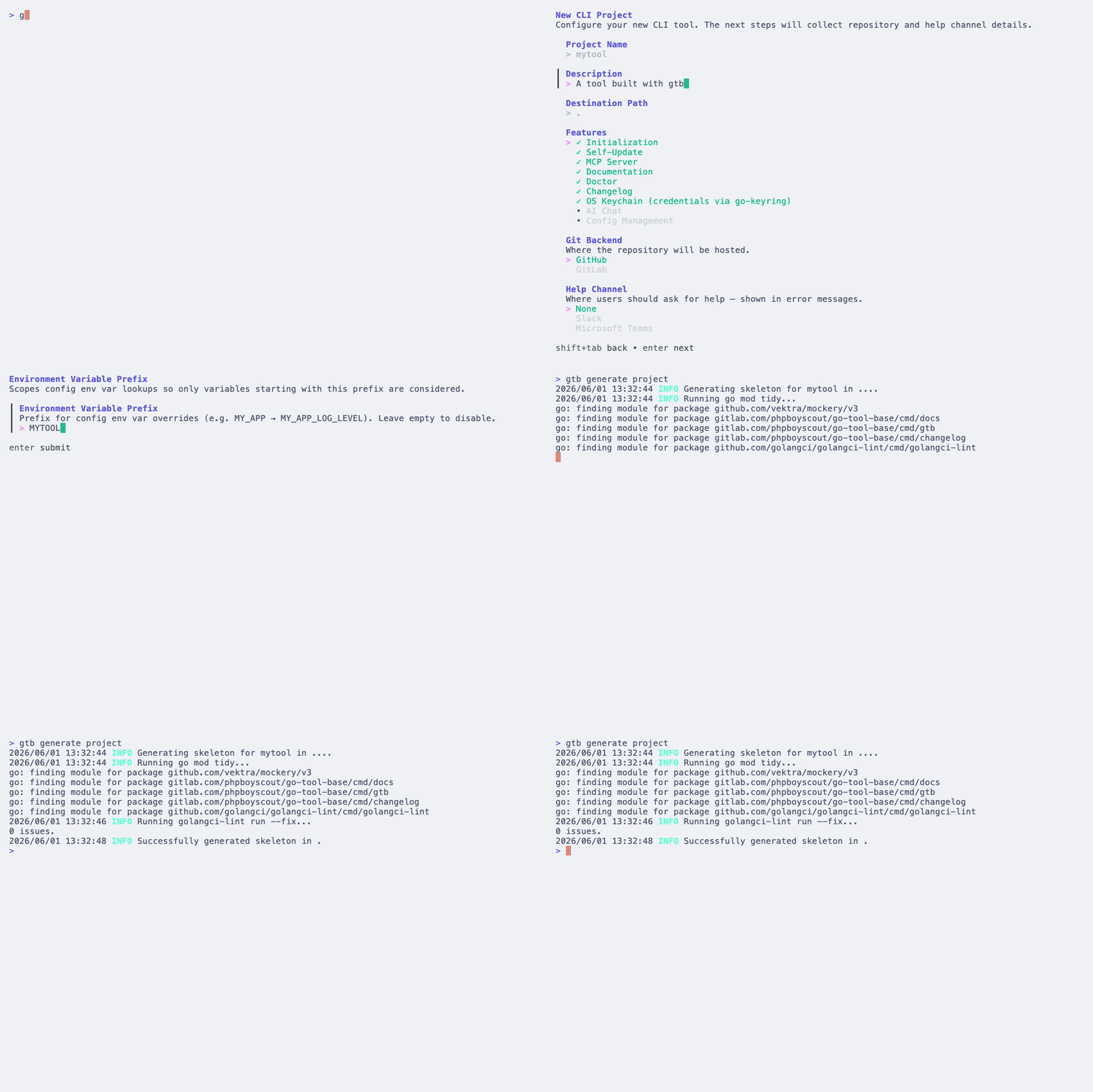
Either way, one of the choices is worth calling out now, because it explains
something you’ll see in a minute: features. go-tool-base bundles a set of
ready-made commands, self-update, embedded docs, a doctor health check, an
MCP server, a changelog, OS-keychain storage, and you choose which ones your
tool ships with at generation time, either through the --features flag or a
checklist in the wizard. The default set is a sensible starting point, and you
can add or drop features later. That is why, a moment from now, your brand-new
tool already answers --help with commands you never wrote. The full flag list
is in the generate reference.
What you just got
cd mytool and look around. It’s a complete, releasable project, not a
hello-world:
mytool/
├── cmd/mytool/main.go            # entry point
├── pkg/cmd/root/
│   ├── cmd.go                    # builds Props, wires the root command
│   └── assets/init/config.yaml   # embedded default config
├── internal/version/version.go   # version info, stamped at release
├── .gtb/manifest.yaml            # the generator's record of your command tree
├── .github/workflows/            # lint, test, docs, release pipelines
├── justfile                      # build / test / lint / docs tasks
├── go.mod                        # with `go tool` deps pinned
└── ...                           # .golangci.yaml, .goreleaser.yaml, README, CHANGELOG
One file there is worth understanding before anything else: .gtb/manifest.yaml.
It is the generator’s source of truth, a record of every command your tool has,
how they nest, and a content hash of each generated file. You won’t edit it by
hand, but gtb reads and rewrites it constantly. It is how the generator knows
what your command tree looks like, and how it can tell whether you have changed
a file it owns. Think of it as the map the generator builds from: it’s committed
to git for you, and as long as it’s there, your tool’s structure stays
reproducible. We’ll see it earn its keep when we regenerate.
The entry point, by contrast, is tiny, because the framework does the lifting.
Here’s the generated cmd/mytool/main.go in full:
// Code generated by gtb. DO NOT EDIT.

package main

import (
	"mytool/internal/version"

	gtbRoot "gitlab.com/phpboyscout/go-tool-base/pkg/cmd/root"
	"mytool/pkg/cmd/root"
)

func main() {
	rootCmd, p := root.NewCmdRoot(version.Get())
	gtbRoot.Execute(rootCmd, p)
}
Two lines of body. root.NewCmdRoot (in your pkg/cmd/root/cmd.go) builds a
Props,
the container that carries the logger, config, filesystem and version to every
command. gtbRoot.Execute runs it and routes any failure through one
consistent error handler,
so there’s no os.Exit scattered about. Note the DO NOT EDIT header: main.go
and the root cmd.go belong to the generator. Your code goes elsewhere, which
matters in a minute.
Build it and you already have a working CLI:
just build        # or: go build -o bin/mytool ./cmd/mytool
./bin/mytool --help
You’ll see the built-in commands from the features you picked, update, docs, doctor and the rest, with not a line written by you.
There’s one step before those commands will actually run. Try one, say
./bin/mytool docs, and the tool stops with please run init: it has no
configuration yet and won’t guess at one. So give it some:
./bin/mytool init
That writes ~/.mytool/config.yaml from the defaults your tool ships with, and
now its commands run. (init is itself one of the features. You can switch it
off for a tool that should run straight from its built-in defaults with no file
at all, but leave it on for now.) Part 2 takes configuration apart properly; for
now, init once and carry on.
Add your first command
Don’t hand-roll a command file. gtb generates the boilerplate and leaves you
the logic:
gtb generate command --name hello --short "Say hello"
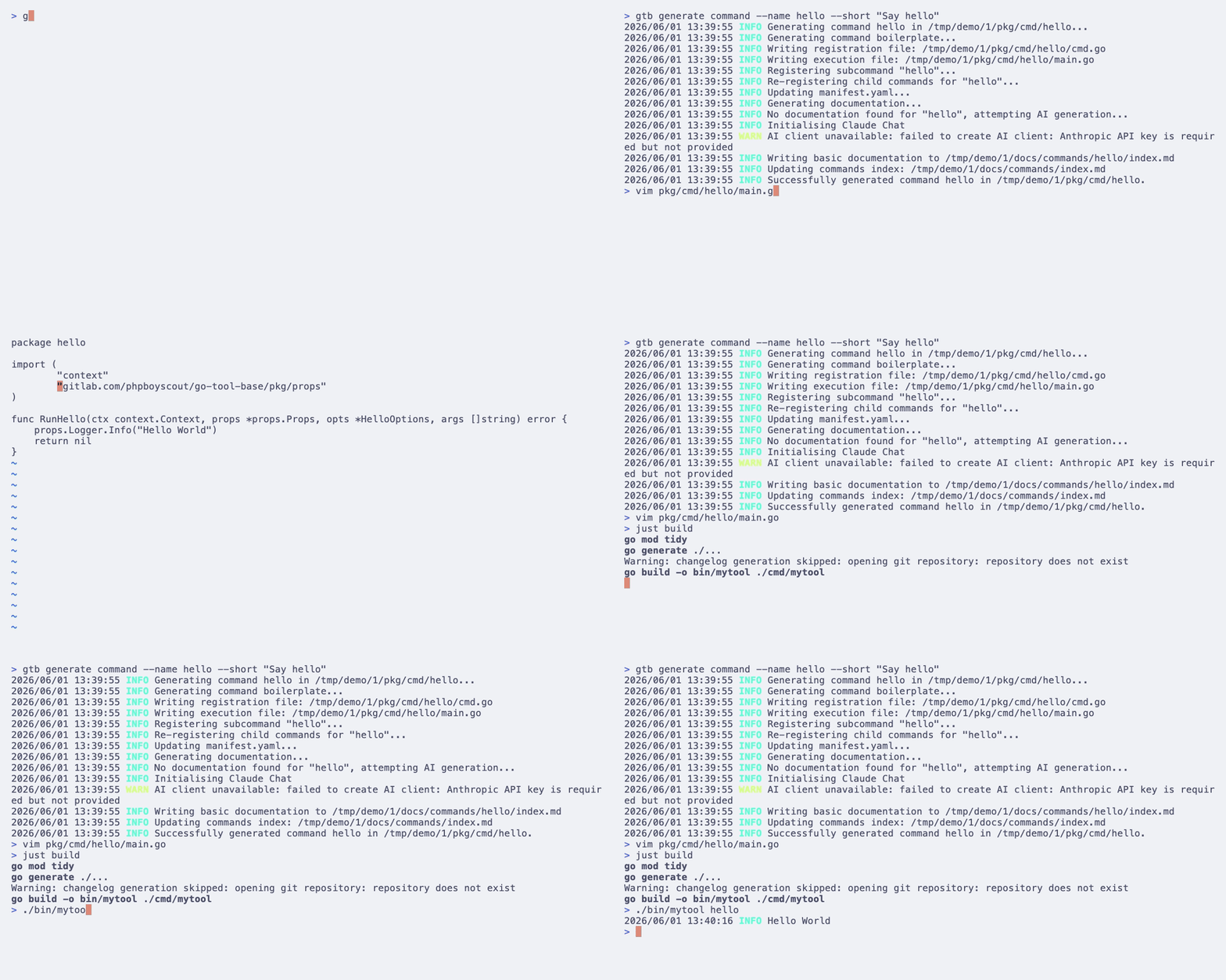
That creates two files (see the command reference):
pkg/cmd/hello/cmd.go(generated,DO NOT EDIT): the options struct, flag wiring, and theNewCmdHello(props *props.Props)constructor.pkg/cmd/hello/main.go(yours): aRunHellofunction, where all your real business logic goes.
The split is the whole point. Open pkg/cmd/hello/main.go and write what the
command does:
func RunHello(ctx context.Context, props *props.Props, opts *HelloOptions, args []string) error {
	props.Logger.Info("hello from mytool")
	return nil
}
Rebuild, and the command is wired into the tree:
just build
./bin/mytool hello
You never touched the root command to register it. gtb recorded hello in
that .gtb/manifest.yaml and wired it in for you. (If you’d rather wire commands
by hand against the library directly, the
custom-commands how-to
shows that path; the generated route is the one this series follows.)
Regenerate without losing your work
Here’s the bit people are right to be wary of. If the generator owns cmd.go
and the root wiring, what happens when it runs again, after you’ve made changes?
And it runs often: every gtb generate command rebuilds the wiring.
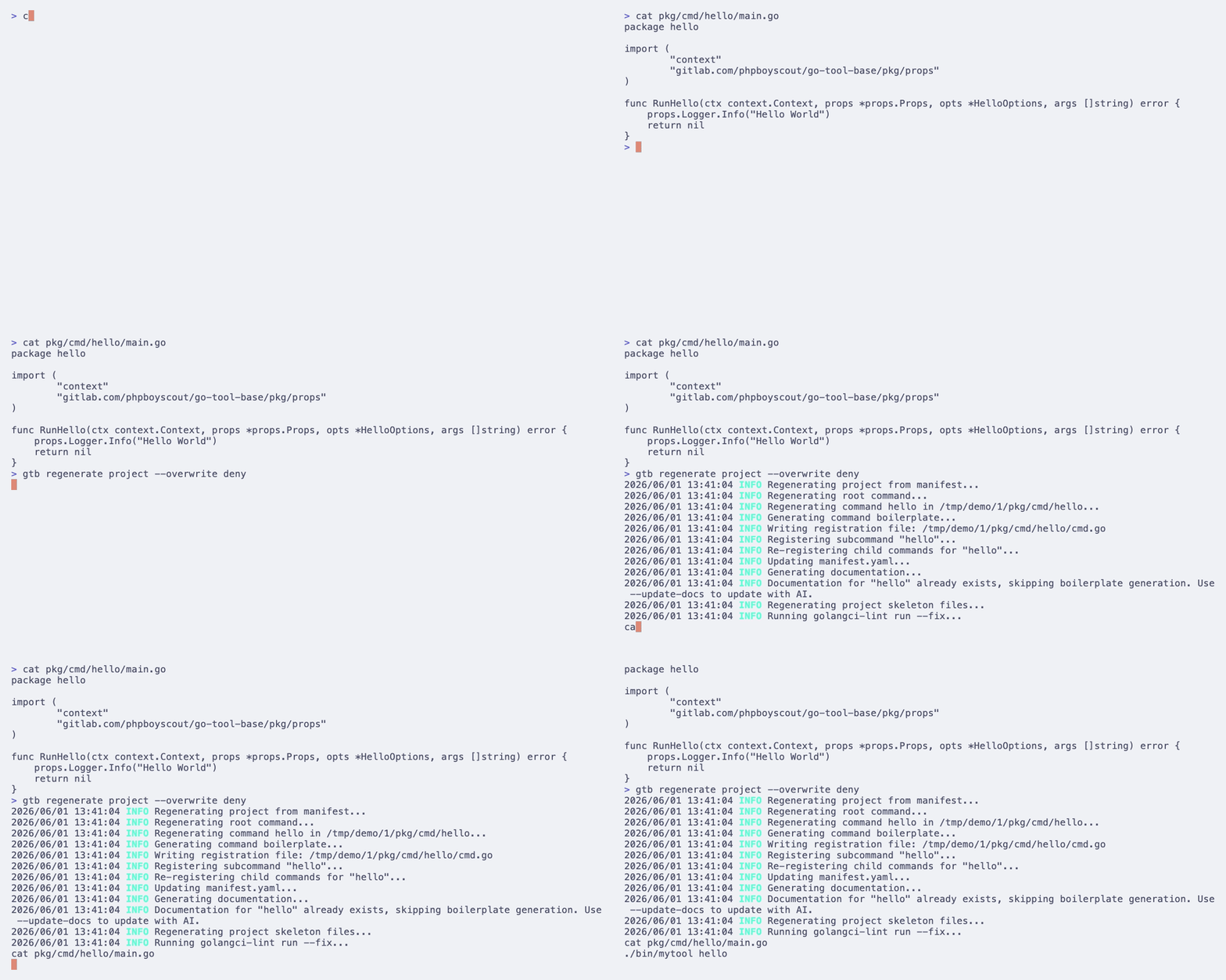
gtb regenerate project
Your edits survive, and not by luck. Three separate things protect them:
- Your logic sits in a file the generator never rewrites. Command logic
lives in
main.go; only the boilerplatecmd.gois regenerated. The split isn’t cosmetic, it’s the contract. - It notices if you edited a generated file. That manifest stores a content hash of every generated file, so if you’ve changed one, regeneration stops and asks before overwriting rather than silently stamping over you.
- You can fence files off entirely. A gitignore-style
.gtb/ignoretells the generator to leave specific paths alone, even under--force.
I wrote up how that edit-preserving diff actually works if you want the mechanism; the regenerate reference has the flags. For now, the thing to trust: scaffolding here is not a one-way door. You keep regenerating as the tool grows, and your edits stay put.
Where this leaves you
A few minutes in, you have a real CLI: config, logging, a consistent error
path, self-update, embedded docs and a release pipeline, none of it written by
you, plus your own hello command and the confidence to regenerate without
fear. That’s the head start go-tool-base exists to give.
Next part: configuration. Typed settings, defaults the tool ships with, and how to turn a misspelled config key from a silent shrug into an error that tells you what you got wrong rather than a mystery you debug at 2am. Until then, go add a few more commands. You’ve got the pattern now.